Hill Lists 4.2 now available

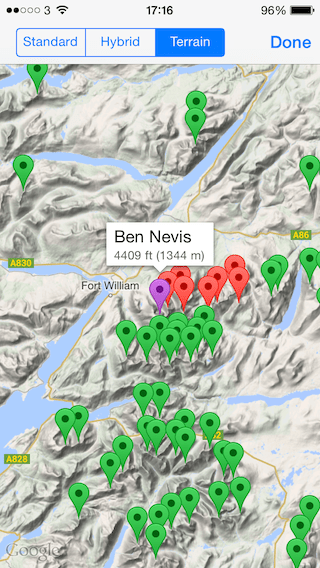
hlicon57 Added support for Google maps, including their terrain view (see below). Just enable it in the settings and view maps as normal.

Moved to Google’s geocoding service to support searching for your location by name. The old service I have been using for 4 years was removed on 1st May without notice!

Added parent hills to let you search for all tops of a given hill.

The minimum iOS version is now 6.0.

2014-05-18 17.16.51

PS the map above is from my own Munro list. Still haven’t done the Grey Corries, the Aonach’s, Carn Mor Dearg or Ben Nevis, but I should have those out of the way in a few weeks. Then it’s down to Knoydart, Monar, Fisherfield and a few other individual hills! 32 to go …

UPDATE I’ve now done Knoydart and the Grey Corries. Only 18 to go …

🙂

Hill Lists map support

hlicon57 In the very beginning (v1.0), long before a licence agreement was made between Apple and Google, I used Cloudmade (open source) maps. However they were pretty slow (back then), so when Google maps were made available to developers, I quickly switched.

All was well until iOS 6, when Apple changed to their own maps behind the scenes. One reviewer even blamed this on me, when I hadn’t changed a single line of code!

So on to 2014. Google maps are coming back as an option in version 4.2, but there is more. I now support terrain view, which is FANTASTIC for viewing hills. Here is the full set of changes in my latest version, just submitted to Apple …

Added support for Google maps, including their terrain view. Just enable it in the settings and view maps as normal.

Moved to Google’s geocoding service to support searching for your location by name. The old service I have been using for 4 years was removed on 1st May without notice!

Added parent hills to let you search for all tops of a given hill.

The minimum iOS version is now 6.0.

Meter Readings 4.2 now available

mricon57 Improvements to the line graphs, specifically when touching and dragging.

Added support for using the Apps folder on Dropbox. To change, simply unlink and re-authorise the app to Dropbox. Note that you will need to copy any files yourself, either from the app or by using a computer.

Fixed a layout issue on the readings screen.

Other minor bug fixes.

Hill Lists 4.1 now available

hlicon57 Updated the underlying data to use version 14 of the Database of British and Irish Hills. This includes some minor hill changes, plus the Binnions list now includes hills with a drop of only 100m (was 150m).

Added a description of the summit feature for over half the hills in the app, very useful in the mist!

Added external links to hill-bagging.co.uk (for all hills).

Added support for using the Apps folder on Dropbox. To change, simply unlink and re-authorise the app to Dropbox. Note that you will need to copy any files yourself, either from the app or by using a computer.

Worked around an issue where access to MWIS forced the app to quit to load Safari (iPad only).

Note that the minimum iOS version is now 5.1.1.

Account Tracker 4.1 now available

aticon57 Completely REPLACED the TWO date entry options with my own iOS 7-like date picker. As a result I have now REMOVED the option for choosing the date entry type from the advanced settings screen. In the previous version, the calendar input was NOT removed, you just had to change the setting.

RESTORED the blue buttons on the accounts, account and budget screens. I changed this in my last update to use swipe and edit because the blue i button and arrow combination took up far too much space, especially on the iPhone/iPod Touch. Since then I have discovered that iOS 7 has introduced a mode where you can display the i button only, without the arrow. This is much better from a space perspective, although you do still lose some width.

Layout and text colour changes throughout the app.

Minor bug fixes.

Meter Readings 4.1 now available

mricon57 Minor improvements to the layout on iOS 7.

By popular request, added support for storing notes per reading. This is done on the Readings screen, by tapping the blue button(s). Readings with notes are shown with a yellow background.

When using touch/hold on the graphs, the app now displays the percentage change from last year to this, as well as the absolute values.

ATB Viewer for Mac 1.1 now available

atbv-64x64
This is the first of many updates – please keep the feedback coming!

The app now detects iCloud backups that are too old to support syncing, and it suggests that you make a new backup.

Added support for resizing the account and transaction table columns, and remembering your settings between launches.

Changed the default colours used on the budgets and reports screens to match my latest iOS 7 update.

Improved the way the app handles its windows. If you close the main window, it will now terminate the app, ready to be re-launched.

Fixed bugs to do with balance calculations when viewing transactions in descending order (newest first), and also the blank transaction screen issue (caused by having empty account groups).

Other minor improvements.

If you find ANYTHING that is not working correctly, see my support page or get in touch.

Mac app pricing vs iOS

atbv-64x64
In their Q1 2014 results, Apple stated that they sold 51 million iPhones, 26 million iPads and 4.8 million Macs. That is 77 million iOS devices vs 4.8 million Macs. Or approximately 16 times more iOS devices than Macs.

This statistic is also evident in app sales figures. In October 2009, my Meter Readings app made it to the 15th top paid iPhone app in the UK and at that time it had around 700 downloads per day (as a result of it being featured in The Sunday Times and then by Apple themselves – my normal sales figures are a LOT lower than this, believe me!).

Earlier this month I launched ATB Viewer, my first Mac app and a companion to Account Tracker on iOS. It soon made it to the 11th top paid Mac app in the UK, with just 40 or so downloads. Yes, 40. This just confirms that the market is significantly smaller and inline with device sales.

There is no real difference to the cost of developing an app for iOS vs one for the Mac. In fact I would say developing for the Mac is more time consuming, due to its older, convoluted APIs. So if it costs roughly the same, yet the available market is 15-20 times smaller, clearly Mac apps need to cost 15-20 times as much to make the same amount? And if a developer can’t break even, they are NOT likely to support the platform.

Of course, not all Mac apps are this expensive. However I can almost guarantee that the cheaper ones don’t make their developers any money at all. Chances are they will be working REALLY hard for next to no return.

So, on to the real reason for this post … 🙂

A couple of people have complained, saying my ATB Viewer app is “overpriced” or “not good value” at £4.99 (*). Sure it is more than an iOS app. Out of the purchase price, I get around £3. So on a day when I made it to the 11th top paid app in the UK, I made £120 (most of my sales are in the UK). It is looking like normal sales will be around 1-5 per day, or £3-£15. Given that it costs 10s of £1000s to develop an app (**), and £1000s to support it each year, it will take MANY YEARS to get the cost of development back, if ever!

When I do release a full version of Account Tracker for Mac (later this year), I will probably charge £14.99 as that seems to be the low end of the “better” finance apps. This would be discounted for a short period so that those of you who support me don’t feel they are paying twice.

In summary, I (and probably 99.999% of other app developers too) don’t make a lot out of app sales. For me it is a fun hobby, and I am thankful I have a full time job to support myself and my family. But having said that, I don’t feel I should work for nothing!

* £4.99 is 1 cheap bottle of wine, 2 coffees, or 1.5 pints of beer

** about the cost of a car, depending on its functionality

Account Tracker 4.0 now available

aticon57 This is a MAJOR UPDATE, adapting the user interface to iOS 7. If you don’t like change, or you don’t like the iOS 7 interface in other apps, PLEASE DON’T UPGRADE as there is no easy way to go back. Please see here for an idea of how the app will look on a device running iOS 7 (earlier iOS versions will not see this UI change).

Note that you can no longer configure the “black” theme on iOS 7. Also the blue arrow buttons on the accounts, account and budgets screens have gone as they take up to much room. Instead, swipe right to left on a row and select Edit.

Also included are the following enhancements …

Added support for importing UTF8-encoded CSV files.

Added options for backup reminders after 14, 21 and 28 days. Also quick restart periods of 30, 45 and 60 minutes.

Other minor improvements.

Note that the minimum iOS version now supported is 5.0.