I hope you like my new marketing images for iTunes (see below for an example). These were all done by my son who is studying Digital Interactive Design at Dundee University. If anyone needs any graphic design work doing, please get in touch! 🙂

I hope you like my new marketing images for iTunes (see below for an example). These were all done by my son who is studying Digital Interactive Design at Dundee University. If anyone needs any graphic design work doing, please get in touch! 🙂

Changed the budgets such that the yellow warning ignores future transactions. The bar and amounts will still show all transactions in the selected period.
On the balance report, you can now touch and drag across the graph to show the end of day balance for each day.
Added support for using the Apps folder on Dropbox. To change, simply unlink and re-authorise the app to Dropbox. Note that you will need to copy any files yourself, either from the app or by using a computer.
Added an advanced setting to set the default week start day on the calendar.
Added an advanced setting to set the default timezone you want the app to work in. You should only need to change this if you happen to be travelling when you update the app.
You can now remove/archive transactions from the oldest year used in the app. Your current balances are maintained, but all transactions from the selected year will be permanently deleted. This feature can be accessed by tapping Reset on the Advanced settings screen. You might have to disable syncing first.
Minor layout improvements and bug fixes.

I am just making a few tweaks to my ATB Viewer app, so thought I would provide a brief update on a full version of Account Tracker for Mac.
First of all I am very glad I got the viewer app out in January, not just because I knew the full version would take a LOT of extra work but because I genuinely think it is a useful companion app. Quite a few people have commented that they use it daily to see their data on the bigger screen of their Mac’s. As a reminder, it can do everything the iOS version can, except add and edit transactions. All the budgets and reports are there, and you can view all of your accounts and transactions.
As a side effect of releasing my first Mac app, it has given me a good insight into the relative size of the two markets: iOS vs OSX. Please read this post for an explanation of why Mac apps cost a lot more than iOS apps.
So where do things stand today? To be honest, I have been disappointed by how few users have bought my backup viewer (a few hundred at most). I am really using this number to gauge the size of the market, and to decide on a price for the full version. Fundamentally the more of you who buy my backup viewer, the sooner I will get round to developing a full Mac version, and the cheaper it will be.
As to when this might be, it really is up to you.
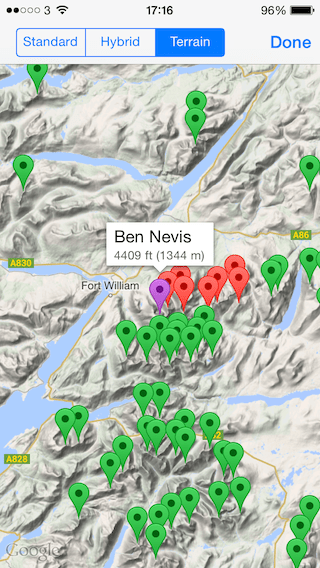
Added support for Google maps, including their terrain view (see below). Just enable it in the settings and view maps as normal.
Moved to Google’s geocoding service to support searching for your location by name. The old service I have been using for 4 years was removed on 1st May without notice!
Added parent hills to let you search for all tops of a given hill.
The minimum iOS version is now 6.0.

PS the map above is from my own Munro list. Still haven’t done the Grey Corries, the Aonach’s, Carn Mor Dearg or Ben Nevis, but I should have those out of the way in a few weeks. Then it’s down to Knoydart, Monar, Fisherfield and a few other individual hills! 32 to go …
UPDATE I’ve now done Knoydart and the Grey Corries. Only 18 to go …
🙂
In the very beginning (v1.0), long before a licence agreement was made between Apple and Google, I used Cloudmade (open source) maps. However they were pretty slow (back then), so when Google maps were made available to developers, I quickly switched.
All was well until iOS 6, when Apple changed to their own maps behind the scenes. One reviewer even blamed this on me, when I hadn’t changed a single line of code!
So on to 2014. Google maps are coming back as an option in version 4.2, but there is more. I now support terrain view, which is FANTASTIC for viewing hills. Here is the full set of changes in my latest version, just submitted to Apple …
Added support for Google maps, including their terrain view. Just enable it in the settings and view maps as normal.
Moved to Google’s geocoding service to support searching for your location by name. The old service I have been using for 4 years was removed on 1st May without notice!
Added parent hills to let you search for all tops of a given hill.
The minimum iOS version is now 6.0.
Improvements to the line graphs, specifically when touching and dragging.
Added support for using the Apps folder on Dropbox. To change, simply unlink and re-authorise the app to Dropbox. Note that you will need to copy any files yourself, either from the app or by using a computer.
Fixed a layout issue on the readings screen.
Other minor bug fixes.
Today I got my first negative review for a long time criticising something valid(*). So infrequent is this event that I felt a response was due! 🙂 Well done to Steve Ives in the UK – if you get in touch I will send you a prize!
In his review he complained about the import capability of the app, specifically that I only support CSV and that it has to be in exactly the right format. I don’t disagree with his comments. So what are the alternatives and why haven’t I “fixed” this?
The main reason is that I don’t expect people to import transactions more than once. The app is designed to be used on the go, and many users tap in transactions in between paying for things and getting their change! The entire workflow is based around quick data entry where it only takes perhaps 5-15 seconds to key in a new transaction. And assuming I am a typical user, I enter less than 1 transaction per day.
I suppose the alternative is to download a statement from your online bank once per month. But surely that defeats the purpose of the app? For a start your data is always weeks out of date, plus the app can be used to track dozens of accounts not just the one (I track nearly 50!).
I could add support for the various financial data formats – its just a matter of my time, and I haven’t regarded this as important enough to implement above other things.
CSV is fairly common, however you do need to put it in the right format. Why? Because there are probably 1000s of different bank formats worldwide and I can’t support them all. I could adaptively learn, or ask the user to identify each column. Again its a matter of my time and priority. The most difficult thing to solve though is the date format. Not just whether 2/3/2014 is the 2nd March or 3rd February, but handling 1000s of other ways to express dates, across 100s of languages.
As I say, I am not disagreeing with Steve’s comments, just trying to explain my way of thinking.
* not saying there aren’t things to criticise – there most certainly are! However most negative reviews are from people who simply don’t read the documentation or are just complaining about the iOS 7 user interface!
Updated the underlying data to use version 14 of the Database of British and Irish Hills. This includes some minor hill changes, plus the Binnions list now includes hills with a drop of only 100m (was 150m).
Added a description of the summit feature for over half the hills in the app, very useful in the mist!
Added external links to hill-bagging.co.uk (for all hills).
Added support for using the Apps folder on Dropbox. To change, simply unlink and re-authorise the app to Dropbox. Note that you will need to copy any files yourself, either from the app or by using a computer.
Worked around an issue where access to MWIS forced the app to quit to load Safari (iPad only).
Note that the minimum iOS version is now 5.1.1.
I have received a lot of very positive feedback for my new calendar picker, however a number of people have also asked for the week start date to be configurable. My app has always used Monday as the start date for entering dates, but I can understand that some people would prefer (e.g.) Sunday.
My calendar picker was written with any day in mind, and there is even a setting in the main settings app that I could use (under “Mail, Contacts, Calendars” at the bottom). However there doesn’t seem to be a way to access this setting from within an app. I even have code for this that works fine on OS X but doesn’t on iOS. I have therefore opened a bug against iOS.
If Apple come back with a workaround to this issue, I will happily support the day you choose in the settings app.
UPDATE: no response from Apple after a month. I will probably add my own setting for this in my next update.
Completely REPLACED the TWO date entry options with my own iOS 7-like date picker. As a result I have now REMOVED the option for choosing the date entry type from the advanced settings screen. In the previous version, the calendar input was NOT removed, you just had to change the setting.
RESTORED the blue buttons on the accounts, account and budget screens. I changed this in my last update to use swipe and edit because the blue i button and arrow combination took up far too much space, especially on the iPhone/iPod Touch. Since then I have discovered that iOS 7 has introduced a mode where you can display the i button only, without the arrow. This is much better from a space perspective, although you do still lose some width.
Layout and text colour changes throughout the app.
Minor bug fixes.