Hill Lists 3.5.1 now available

Fixed a few issues introduced by iOS 7.

Also corrected the links to MWIS (iPad only). The app still redirects to Safari to view these pages, but the fix for this is with MWIS not my app.

Note that for users running iOS 7 and above, Bluetooth is no longer supported for copying backup files between devices. Apple have deprecated the way this works, and I need to completely rewrite it.

Account Tracker 3.9.5 now available

Fixed a number of issues introduced by iOS 7, mainly around iCloud access and syncing. Also added a workaround for an iOS bug that caused a crash when entering the budgets or reports tab.

Note that for users running iOS 7 and above, Bluetooth is no longer supported. Apple have deprecated the way this works, and I need to completely rewrite it. Since this was only added as a way to copy files between devices and the app now supports both iCloud and Dropbox, I am not planning to do this.

iOS 7 glitches in my apps

Despite testing beforehand, and having a number of people actively using my apps with all the iOS 7 betas, a few issues are now becoming apparent. Its inevitable really, with the sheer number of iOS 7 users. 😦

Here is my current list of known issues …

1. Account Tracker: when you try to bring a new SECONDARY online, the initial sync from the PRIMARY might never happen. It seems it works some of the time, but more than likely, not. Fixed in v3.9.5.

2. Account Tracker: in the budgets and reports (list) views, if you select one of the rows to show the transactions screen, then leave that tab and later go back to it, the app has chance to crash. Fixed in v3.9.5.

3. Account Tracker: if you have iCloud syncing enabled, and have somehow managed to turn off the Documents and Data option in the main settings app (under iCloud), the app will crash when closing. You won’t notice this directly, apart from losing your recent changes. To fix this, turn Documents and Data back on. Fixed in v3.9.5.

4. Meter Readings: swiping between meters doesn’t work if you do this on the graphs themselves. It is fine on the iPhone though. Fixed in v3.4.

5. All Apps: transferring backup files by Bluetooth no longer works. Apple have deprecated the way I do this and replaced it with something that requires a complete rewrite. Bluetooth support was added many years ago as a way of copying backup files around, but it has since been replaced by the more convenient iCloud or Dropbox. I will disable Bluetooth support for iOS 7 and above in my next update(s).

6. All Apps: I have noticed a few minor glitches in the UI, e.g. grouped tables don’t rotate cleanly, almost certainly an iOS bug. Fixed in Meter Readings v3.4 and Hill Lists v3.5.1. I will be fixing Account Tracker in my next update.

iOS 7 is coming soon!

As I am sure you all know, iOS 7 will be released next week. See this post from Apple for full details.

I have tested all of my shipping apps, and am not aware of any issues (but see below), although there are a few visual differences. See my post from late June where I go into this in more detail.

With all major operating system updates like this, I would highly recommend backing up all of your app data before upgrading. Don’t just rely on iTunes, use the backup solution in each app, and export your data off your device, just in case anything goes wrong.

On a related note, every few months I am contacted by a customer saying “my toddler has just deleted my app, I restored my purchase from the AppStore but all my data is gone”. Apple’s sandbox model means that apps can only store their data with the app itself (or now iCloud, however this is VERY slow for large amounts of data). This, together with a lot of bad experiences with iTunes backups, is specifically why all of my iOS apps include a backup solution.

If you value your data, PLEASE take regular backups. Oh, and don’t let toddlers play with your main device! 🙂

UPDATE (15th September) – it seems that Apple have changed something behind the scenes that prevents a primary device from sending the initial sync to a new secondary. I have a workaround for this, and will submit it once I see whether there are any other issues.

Account Tracker 3.9.4 now available

This is minor update with a couple of improvements and UI tweaks, specifically …

Added support for syncing group names and budgets. You will need to disable and re-enable syncing on all devices for this to work (otherwise I have no way of knowing that your groups are consistent between devices).

Added a new budget colour (yellow). This is only shown if your budget period includes TODAY, and is used to highlight potential overspend (or under income!), i.e. you are within your overall budget for the selected period, but if things continue you will not meet it. Think of it as an early warning.

Improvements to CSV export when showing splits.

Detect and allow empty recurring series to be deleted.

Enable the three transaction views by default (for new users).

Account Tracker 1.2 (for Windows Phone) is now available

This is a minor update to fix a Microsoft bug that corrupted files downloaded from SkyDrive. I have tested this and it now seems to work fine.
Note that you might need to delete any files that you have already downloaded to the app from SkyDrive, before re-downloading them. It was the download process that was broken, nothing to do with the files themselves.

If in doubt, please ask!

Account Tracker for Mac update #6

atmac-64x64
A couple of people have been asking about this recently so here is another update.

I have now released a small number of betas to around 25 people who are helping out with testing and providing useful feedback. The equivalent(s) of the account(s) screen, transaction screens, budgets and reports are all implemented and working well. It also handles exchange rate updates and stock valuations too (in the same way as iOS).

I am currently working on editing transactions and reconciling.

Other areas that need work are iCloud and Dropbox integration (including syncing), importing and exporting transactions (CSV), PDF reports and of course settings. It is still a good way off releasing as a paid for product, but I am shooting for before Christmas for sure.

Downloads from SkyDrive broken

In a recent change to its SkyDrive service, Microsoft have introduced a bug that causes corruption of files downloaded by older or existing apps (including Account Tracker for Windows Phone). See http://architects.dzone.com/articles/skydrive-breaking-changes-live.

I reported this to Microsoft a couple of days ago, and they were unaware of the issue. They are now investigating. I am hoping they can fix this at their end, rather than it requiring an app update.

Note that existing backup files are actually fine, and should be useable again once they fix the download problem.

UPDATE 1 (29th July) – I am about to submit a fix for this to Microsoft.

UPDATE 2 (2nd August) – Microsoft have now fixed this. See http://social.msdn.microsoft.com/Forums/live/en-US/52ab9b0f-71f5-437e-be0b-48115a9ba0a9/skydrive-update-related-to-sdk-5052-and-wlupload.

iOS 7 – second impressions

IMG_0004


I installed all of my current shipping apps onto an iPhone 4 running iOS 7 beta 2, to test them out. The quick summary is that pretty much everything works as expected. In fact the only issue I have found is that sometimes the PIN entry keypad on Account Tracker fails to show (but a few taps causes it to appear).

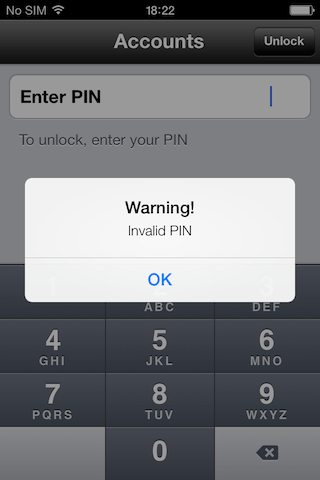
There are three known UI changes, even for apps compiled against earlier versions of iOS. I have included screenshots below. The first is for popup windows in the middle of the screen (UIAlertView). These now look like …

IMG_0001


The second is for options that are displayed from the bottom of the screen (UIActionSheet) …

IMG_0002


Finally Apple have changed the alignment of text below grouped table sections, from centre to left (can’t say I like this at all, but perhaps I’ll get used to it!) …

IMG_0003

iOS 7 – initial impressions

iosicons


I have just re-built my apps against the iOS 7 SDK and tried them on the simulator. WOW! Apple have COMPLETELY changed the default look of the navigation bars, tables, section headers, popups … etc, pretty much everything!

For the most part my apps work, however to support iOS 7 natively there are a bunch of things that will definitely need fixing. For example table heights, the blue buttons, text alignment, colours … etc.

I haven’t tried running my existing (published) apps on iOS 7, so it will be interesting to see how they look and behave. More on that later no doubt(*) …

* see my second impressions post