
 And they did one for Meter Readings too! See http://youtu.be/nLuDWDygSDE.
Category: Announcements
Account Tracker for Windows Phone video
 Andras from Response Ltd (the developers who ported Account Tracker to Windows Phone) have posted an excellent overview video of the app. See http://youtu.be/45NwHdP-viQ.
Many thanks Andras!
Getting started with my Meter Readings app
 Setting up your meters and rates can be a complicated business, not helped by your energy supplier! Here are some troubleshooting tips to help you get started …
1. From your last bill, simply enter your starting reading/date, and your ending reading/date.
2. Select the Readings row at the top of the main screen. You should see these two readings, with usage and cost figures between them.
3. Check the usage is calculated correctly (it should be your ending reading minus your starting reading). If it does not match your bill EXACTLY, you either need to set the conversion factor in the meter settings (common for gas meters), or you have changed the meter direction. Most meters count up, meaning your usage is calculated by subtracting one reading from another. However the app also supports counting down and/or assuming your readings themselves are your usage.
4. Once you have correctly got the app calculating your usage, take a look at the costs between these readings. Assuming you have entered your rates, the resulting amount in the app should be VERY close to your bill, within pennies. If not, chances are you haven’t entered your rates correctly. NOTE that it might be difficult getting an exact match. This is because the app is far more accurate than your supplier, not the other way round!
5. If you want to see how the app is calculating costs, go back to the main screen and select the Current row. This shows a breakdown for your most recent pair of readings.
6. Once things are working correctly for one pair of readings, you can start entering them as often as you like, the more frequent the better.
Note that the graphs screen shows usage and costs based on the CALENDAR, and not between any specific pair of readings. For instance a whole month could be calculated from many pairs of readings. By default your most recent usage and costs are extrapolated to the end of the graph. If you don’t want the app to do this, simply turn the extrapolate setting OFF.
If you are stuck, and the built in user guide or https://grahamhaley.co.uk/meters/meters-and-rates/ doesn’t help, please get in touch.
Account Tracker 3.9.3 now available
 A couple of fixes and a few improvements. Hope you like them!
FIXED a bug to do with multi-currency transfers when deleting one of the accounts.
FIXED a crash on the iPad when selecting the Reset button on the Advanced settings screen.
CHANGED the alerts to always fire at the time selected, even if you have already run the app that day. Previously alerts would only fire from the day after you last ran the app.
CHANGED the reports screen to show negative numbers in red (if configured to do so in the settings).
CHANGED the workflow when entering the details and category fields. A small number of users only set one of these, which is something I hadn’t really anticipated. The app now checks for this situation and in this case it doesn’t take you from one screen to the other automatically when entering these fields.
CHANGED the All transactions screen. This now shows both historical and future transactions, making the Scheduled transactions screen redundant (it has been removed, or rather replaced – see below). You can now scroll up and down the transaction list quickly, as well as scrolling to today. Also tap on the right arrow to step forward a month at a time (just like on the account screen).
ADDED support for a Recurring transactions screen. All of your transaction series are shown based on their frequency (daily, weekly, monthly … etc), and you can drill down to see each individual series. By default it only shows those currently active, but you can see older ones (in grey) by tapping on the Show/Hide button.
ADDED support for exporting splits properly in the CSV and PDF files.
More Apple restrictions
In a rather bizarre move, Apple have recently prevented the use of unicode characters in app descriptions on iTunes. I can sort of see what they are trying to do here, i.e. prevent people from simply including 100s of smiley faces, or other such characters that quite frankly make an app description look unprofessional. However the consequence is that they now don’t allow text such as …
★ Apple “Staff Favourite” in the UK, Jul/Aug 2010
or
✔ Track multiple accounts: checking, current, savings, credit cards, loans/mortgages … etc
✔ Separate your accounts into groups, e.g. personal vs business accounts
✔ Enter your recurring transactions using calendar-based repeat intervals, e.g. every 2 weeks, the last Friday of every month … etc
Instead we have to remove these simple but effective ★ and ✔ characters, and replace them with very (very) basic ASCII text like * and -.
I have owned Mac computers since the late-1980s, and even back then there was a wider choice of characters! Hopefully Apple can find a way to accommodate conservative use of “special” characters while preventing their over use.
Peak Scanner app (review)
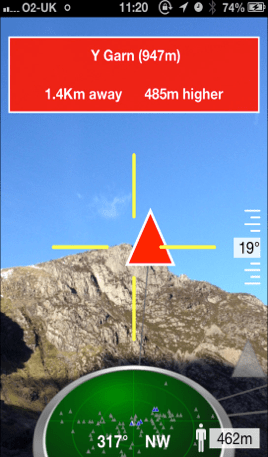
If you like my Hill Lists app for tracking your Munros … etc, you might like to try out a relatively new app call Peak Scanner. It uses the same hills database as Hill Lists, and it lets you use your device’s GPS and compass to see what hills you can see around you. Works pretty well on my iPhone 5 and its definitely worth the £1.49 it costs. It is available on iTunes now.
BTW, their icon (not the screenshot below) is a photo of Mt Taranaki (also known as Mt Egmont) in New Zealand’s North Island. I climbed that in more or less the same conditions in about 1990!
Screenshot …
Meter Readings 3.3.2 now available
Minor update to add support for meters with 3 digits before the decimal point.
Fixed a calculation error when a reading wrapped back to 0 (I already handled the reverse case for meters that can go backwards).
Fixed the bar chart colours when comparing against the previous years figures. In rare situations I was assuming the previous year was 0 when in fact you hadn’t yet entered a year of readings.
Hill Lists 3.5 now available
 Added support for weather forecasts per hill, specifically for Scotland, the Lake District, the Peak District/Yorkshire Dales and Snowdonia. This information is provided by directly accessing the Mountain Weather Information Service webpages (http://www.mwis.org.uk), thanks to some much appreciated co-operation from Andy Ross. The implementation is fairly crude, as it simply maps the section the hill is in to the MWIS regions.
Completely changed the backend database to use the newly released version 13.1 of the Database of British and Irish Hills. This replaces the separate databases for Scotland, Isle of Man, Wales and England (DoBIH) and Ireland (MountainViews). I would particularly like to thank Simon Stewart from MountainViews for supporting a merge of their data into the DoBIH. Also Chris Croker and team for their excellent support.
NOTE: version 13.1 does include a change to the summit location of Beinn a’Chroin (Munro). There is a note in the app about this as it might well affect your Munro count (it did mine!).
The number of hills supported is now 7315. The only casualty is the MountainViews 150s list, which the DoBIH doesn’t support. To compensate for this, I have added support for the following new lists …
Scotland: County Tops, Donald Deweys, Graham Tops and Highland Fives
Isle of Man: County Tops
Wales: County Tops and Furths (replaces the 3000s)
England: County Tops and Furths
Ireland: Carns (replaces the 400s), County Tops, Hewitts, HuMPs, Marilyns and Myrddyn Deweys
You will also notice that the previous UK lists (other than the Trail 100) have been replaced by the equivalent regional ones (e.g. County Tops, Hewitts, HuMPs, Marilyns … etc).
Full details are in the User Guide (tap the settings icon).
Account Tracker 3.9.2 now available
Reinstated (to some extent) the visual difference between reconciled and unreconciled transactions. However instead of using a very pale grey (that some people struggled to read), I use the same colour scheme as reconciled, but reduce the opacity of the colours.
Added a workaround to an iOS bug that told me a keyboard was being displayed when it wasn’t. The symptoms were a large black bar at the bottom of the account or transactions screen, most likely after pressing the power button then re-launching the app.
Many thanks to Steven Van den Borre for letting me know about the latter issue. I am convinced this used to work, and therefore suspect a recent iOS update …
Meter Readings 3.3.1 now available
Fixed a bug when calculating costs across a rate change, specifically for the “since last bill” and “next bill” calculations.
On the backups screen you can now access both Dropbox and iCloud. If you do have both configured, new backups will be sent to iCloud only.
The app now supports up to 9 meters, even without the Power User upgrade.
 Graham Haley