Meter Readings 4.4 now available

mricon57 Added support for setting the meter conversion factor as part of a rate change. This is mainly for gas meters, e.g. where your meter units change from ft3 to m3. Adding a rate change on the day your meter changes lets you use a different conversion factor for each unit.

If your meter uses a single counter/reading, the most recent reading is now displayed on the Meters screen. This is useful when submitting readings to your supplier.

Minor bug fixes.

Backups

“My has somehow deleted my app from my iPhone/iPad. I restored it from the AppStore but all my data is gone. Can you help get it back?”

“I have been having problems with my iPhone/iPad. I took it to the Apple Store and they reset it. When I restored my purchases, my app data is gone. Can you help … etc”.

Surprisingly these are fairly common support requests (certainly once per month), and sadly for these users the answer is not always good news.

Apple’s iTunes backup(s) might help, but they are somewhat unreliable (IMHO). What’s more, since they only store a single backup per device(!), chances are your data is already gone. This is why I added backup support to each of my apps very early on (2010, if not 2009).

If you haven’t ever used this simple feature, then you are seriously at risk of losing your data. Yet using it is trivial …

Account Tracker Pro supports automatic backups – turn on iCloud (or Dropbox) in the settings (*), set the backup frequency (daily, weekly … etc) and you are all set.

Account Tracker supports reminders. Turn on iCloud (or Dropbox) in the settings (*), set the frequency and when the reminder fires, you can back up with a single tap (well ok, three in total).

Meter Readings and Hill Lists support automatic backups too. If your data changes (e.g. you add a reading or ascent), a new backup is made when you close the app, keeping the three most recent.

If you aren’t using backups at the moment and (I assume) you value your data, PLEASE turn this feature on ASAP.

* note that backing up alone will not protect you from either of the scenarios mentioned at the top. You need to make sure your backups are exported off your device, either to iCloud, Dropbox or (e.g.) by email.

Account Tracker PRO – automatic backups

atp57 In version 5.1, I have introduced an automatic backups feature (PRO version only). This post tries to explain how it works.
As a reminder, your data in my app is only ever stored on your own device(s), nowhere else. If you don’t back it up and you lose your phone (or accidentally delete the app!), your data is gone, unless you are lucky enough to have a working iTunes backup (unlikely).

To avoid such a nightmare scenario, you should regularly back up your data. You can do this in my app, from the backups screen in the settings. There is also a convenient reminder option where the app will post a reminder to do a backup, and from there it is 3 taps to make a new backup, copy it to iCloud or Dropbox … etc and return you to where you were.

The automatic backups feature eliminates the reminder and the three taps. Basically the app knows when your last backup was made, and if it is older than the period you set (e.g. weekly), the app will make a new backup and copy it to iCloud or Dropbox according to your settings. This is done when you close the app (with the home button), in much the same way as sync changes are written.

When using automatic backups, the app will also delete your oldest backup for you (if you have at least 3), meaning you don’t have to keep cleaning up your backup list.

I have been using this for the last month, and it is pretty reliable. However if for some reason your automatic backups aren’t working (e.g. no network access), the app will remind you if a backup is a week overdue.

Finally when listing backups, I have changed the colours I use. A safe backup (meaning it is stored off your device, e.g. in iCloud or on Dropbox) is shown in black (as normal), whereas one that might only exist on your device (and therefore needs exporting) is shown in red.

Support changes

After 7 years of using comments on WordPress to provide support for my apps, I have finally decided they really don’t work that well!

The main issue is that when you post a question, you need to sign up to be notified when I respond. This process involves receiving an email from WordPress and for the user to respond to it. Often I have answered the question long before the user signs up(!), so they don’t ever get a notification. As a result I guess many people think my support is poor because I don’t ever respond, yet nothing could be further from the truth! 😦

Also some users don’t sign up at all, but then don’t seem to realise they need to go back to my site to look for responses themselves.

Previously I also used a contact form, but this was even worse. The user had to enter their own email address by hand and a very high proportion mistyped it, either by accident or deliberately (to somehow avoid spam??). I would then go to the trouble of answering, and my response would just bounce, with no way of contacting the user to tell them.

So … I have now added a clickable link to my support page(s) to ask questions by email, replacing the comments box altogether. This way I can be sure the user is getting an answer to their question(s), and as a result I will be happier.

Account Tracker PRO 5.0.2 now available

watch2

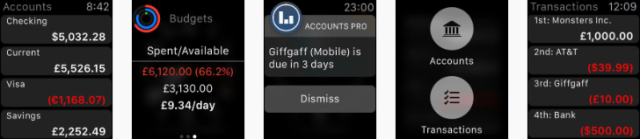
This update includes further improvements to the Apple Watch app, including a better glance view showing the selected budget(s) from the iPhone.

Also the ability to view recent and future transactions (+/- 1 week) by using 3D touch on the accounts screen.

More detail …

The accounts view now honours your selected balance type. Specifically it will display the reconciled balance if this is what you have chosen on your iPhone, otherwise it will display today’s balances.

The glance view now shows your selected budget(s), not just the overall budget. The new screen layout makes it clearer what the figures are, as well as showing you a daily limit (available budget divided by the number of days remaining).

Finally if you use 3D touch on the accounts screen, you can switch between this and the transactions screen. The latter shows recent and future transactions, (+/- 1 week).

Meter Readings conversion factor

mricon57 The conversion factor in the meter settings is used for meters where your measured units are different to your billed units (e.g. m3 vs kWh). As an example my own gas meter measures in cubic feet (ft3), and my most recent bill tells me there are 32.156347 kWh for every cubic foot of gas (just divide the number of kWh you have been billed for by the number of units you have used on your meter).

The true conversion factor changes daily, due to the calorific value of the gas you are supplied with. And this changes based on where you are in the country. Your energy supplier simplifies these complex changes by giving you an average figure per bill.

Back to my app, it would be horribly complicated to track these changes to your conversion factor, so I simply take the single figure you supply and use that for all reading periods. The app is more about making you aware of your usage not the exact amount of each bill.

However if your old gas meter is replaced and you have a completely different conversion factor (e.g. your old ft3 meter is replaced with one that measures in m3), this will change all of your historical costs too. There are two ways around this …

1. Add your new meter as a completely separate meter in the app. You can then set its new conversion factor as before and things will work fine. However you will lose the visual comparison against your older readings.

2. Set your conversion factor to 1 and adjust all your rates (past and present) to be for your metered units. This basically means manually multiplying your kWh rates by your conversion factor to give you your rates per metered unit.

Either way will work, it just depends how much work you want to do.

UPDATE: you can now set the conversion factor as part of a rate change, simply add a rate change and edit the new conversion factor.