Account Tracker PRO – now in colour

coloursNew in Account Tracker PRO, your choice of colour!
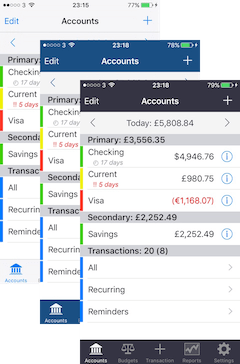
While the flat white look of iOS 7 was very different and new back in 2013, after a couple of years I thought you might want a change. I have therefore introduced two new colour choices in my PRO app.

Same data just different. Available now on the Advanced settings screen.

I hope you like them!

Account Tracker 5.0 now available

aticon57 atficon57 This update introduces a PRO version of Account Tracker, my first paid app upgrade since I launched Account Tracker in 2009! It is a similar but separate app, and includes the following additional features …

  • Apple Watch support, showing up-to-date account balances and a snapshot of your main budgets (what else would you like to see?)
  • 3D Touch support, to quickly launch into adding a new transaction or searching across your accounts (just push on the app icon on a supported device)
  • AirDrop support, to quickly and securely share your backup files between devices (replacing the clunky WiFi option)
  • Database syncing over iCloud or Dropbox built in (no in-app purchases required)
  • New colour scheme(s) and user interface improvements

See the following links for more details …

Account Tracker PRO – Watch screenshots

watch1

My initial Apple watch version is quite limited in what it shows you, however until I get feedback, it is what it is. 🙂

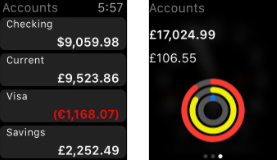
This first screenshot shows a list of all of your accounts and their balances. If you reconcile by date, the balance will be today’s, otherwise it will be your reconciled balance.

At the moment the app shows all accounts, but in my next update I will get it to honour your hidden account settings.

The second screenshot is the glance view. The top figure is the total of your account balances (from above), taking into account whether or not to exclude a given account from your totals (the same as on your iPhone).

The bottom figure is the amount remaining on your overall spending budget (i.e. across ALL accounts). This should be the figure shown at the top right of your budgets screen. Clearly it also depends on which period you are looking at.

The graphic is a round version of the bars shown on the iPhone, red (outside) for spending, yellow (middle) for income and blue (inside) for transfers.

If you tap the glance view, it will launch the app to show your account balances.

Note that the watch gets the latest data from your iPhone at two specific times: when you close the iPhone app and when you launch the watch app. There can be a short delay before the figures are updated in both situations, especially the second one.

Should I upgrade to Account Tracker PRO?

atp57 Account Tracker Pro is my first paid app upgrade since I launched Account Tracker in 2009. In the last 6+ years I have released well in excess of 40 FREE app updates, each one costing me £100s if not £1000s.

In the early days this was fine, as making the app better generated good reviews and therefore more sales. However over the past few years, new app sales have been in serious decline. So much so that a single support query now wipes out most of my profit for that day. FWIW I answered perhaps 1000 questions for users last year, including those on WordPress, Twitter and by direct email.

With the launch of the Apple Watch, Apple have tied it to the iPhone app itself, and there is no way to charge for this additional functionality (despite having to spend over £300 on a test device). The same applies to 3D Touch too (£500+ for a new iPhone). Thanks Apple!

The only way to charge for these features is to release a new app. If you look around the AppStore you will see it is littered with v2 or v3 apps, where the developers are desperately trying to generate revenue.

So … should you upgrade to my Pro version? That is entirely up to you. If you want the new features, then yes you need to (or go elsewhere of course). If you don’t need them, you have a choice. Stick with what you have or consider supporting me.

As for Account Tracker itself, I am not planning to add any more new features, just critical bug fixes (if any are needed).

Account Tracker Pro on the AppStore

Migrating from Account Tracker to PRO

help

There are a number of scenarios to consider, so I will start off with the easiest ….

1. Currently running Account Tracker on one or multiple devices. Simply make a new backup in Account Tracker and (ultimately) restore it in Account Tracker PRO.

The easiest way to do this is to select a backup, choose Export, and then select the Open in Accounts Pro option.

If your backup was copied to iCloud, you can enable this setting in Account Tracker PRO and the backups should be visible on the Backups screen. Select and restore.

Finally if you have a backup in an email, choose the attachment and select the Open in Accounts Pro option.

2. Syncing over iCloud (Personal Sync). You really need to disable syncing, follow option 1 to migrate your data to Account Tracker PRO, and then set syncing up again.

3. Syncing over Dropbox (Family Sync). This is the same as option 2, but instead uses Dropbox behind the scenes.

Account Tracker PRO now available

atp57Account Tracker Pro is my first paid app upgrade since I launched Account Tracker in 2009. It is a similar but separate app, and includes the following additional features …

  • Apple Watch support, showing up-to-date account balances and a snapshot of your main budgets (see below)
  • 3D Touch support, to quickly launch into adding a new transaction or searching across your accounts (just push on the app icon on a supported device)
  • AirDrop support, to quickly and securely share your backup files between devices (replacing the clunky WiFi option)
  • Database syncing over iCloud or Dropbox built in (no in-app purchases required)
  • New colour schemes (see advanced settings)
  • Minor user interface improvements

If you like Account Tracker and want more out of it, please consider upgrading as this helps support ongoing development (sadly new app sales simply don’t cover this any more). Once installed, you can copy your data between the two apps using the Backups feature (e.g. by sharing a backup over iCloud or Dropbox).

Note that Apple Watch support is currently fairly basic, as is the platform itself! Let me know what else you would like to see and I will continue to develop this with each update. Long term users will know what to expect. 🙂

Account Tracker Pro on the AppStore

2015 highlights

Best wishes to you all for 2016!

Here are some personal highlights from the past 12 months …

  • Having finished the Munros in 2014, I “only” climbed 102 hills in 2015. 2 Munros, 14 Corbetts, 2 Grahams, 21 Donalds and many other smaller hills
  • I ran up the nearest hill in my app (Allermuir) 26 times!
  • I went on 184 runs, clocking up over 1500 km (same as last year) with over 42 km of ascent (well over four Everests!)
  • I completed the Pentland Skyline race in October in 3h59:09
  • My new job is going really well, and we are just in the process of moving offices

Some app highlights …

  • My website had 80,518 views from 30,012 visitors
  • There were 1026 comments, which probably means I answered over 500 queries (or 1-2 per day!)
  • I only did 7 app updates throughout the year: 3 on Account Tracker, 2 on Hill Lists, 1 on Meter Readings and 1 on my Mac app
  • I deprecated support for Windows Phone as the platform was just not viable (for me)
  • I have just submitted a PRO version of Account Tracker, adding support for Apple Watch, 3D Touch, AirDrop … etc

(Shamelessly copied and edited from last year)

Apple Watch and Account Tracker

Thanks to a number of recent donations, and the fact that John Lewis had them on sale(!), I finally bought myself an Apple Watch to see how it works … etc. For the record I went for a 42mm Sports model in black (pictured).

I have had it for just over a week now, and first impressions are mixed.

I do like the way you get notifications right there on your wrist, without having to look at your phone. Messages, IMs, email, WordPress updates … etc all ding at me, and often a quick response (e.g. OK) can be sent there and then. But to type anything in you need to revert to your phone.

For people who are not that active, I can see the activity app being useful. It tracks your movement and measures you against your daily goals. If you find yourself sitting down for long periods, it reminds you to stand up 10 minutes before the hour.

The major thing lacking (for me) is a GPS receiver. For example to track runs properly you need to carry your iPhone too, which is not ideal. However once it has trained itself, it can be quite accurate on its own. My Apple watch measured a 9km run to within 70 metres of my Garmin watch. Not bad!

The apps on the watch are not really full blown apps, they are more conduits for their matching iOS apps, with vastly reduced functionality and limited data entry. But this is to be expected I guess. Nationwide simply display your first two bank balances!

Which brings me on to why I bought it. I now have a VERY basic Apple Watch version of Account Tracker implemented. All it does is pick up your latest data to display your account balance(s).

For those of you very keen to see an Apple Watch version, what information would you like to see displayed? (*)

* six people responded. Overwhelmingly they wanted account balances (added in v5.0), but also past and future transactions, a list report of spending and income and adding the odd transaction.

Dynamic Type fonts in Account Tracker

aticon57 atficon57 In version 4.7 of Account Tracker I added support for Dynamic Type fonts throughout. Instead of saying I want a specific text label shown with a given font and size, I use the default for a table (or a smaller default … etc). Apple then display this according to your preferred size setting in the main Settings app under General then Accessibility then Larger Text.

The idea here is to make all apps that support it the same, and to let you choose which size is the most readable for you.

If you think there is an issue with my app to do with font sizes, the answer is your own global settings. To reset this to the default, turn the Larger Accessibility Sizes switch OFF and drag the slider to the middle.

You should then fully close my app and relaunch it, to let these changes take effect.

Account Tracker 4.7 now available

aticon57 atficon57 Added support for the iPad Pro at native resolution(s). Note that split screen mode is not supported.

Added support for dynamic type fonts throughout, allowing the app to change font size according to your global settings (under General, Accessibility, Larger Text). Extremely large fonts will cause some layout issues.

Fixed a bug that prevented data from being imported from the free version or from other apps (e.g. by email).

Fixed a font colour issue on the reports screens.