ATB Viewer for Mac 1.0 now available

atbv-64x64
This is a companion app to Account Tracker for iOS that lets you view your iOS backup files and data on the bigger screen of your Mac!

It can automatically load your latest backup from iCloud, and apply recent changes if you are using iCloud syncing. Alternatively you can manually select a backup file to open (e.g. from Dropbox).

You then have full access to your accounts, budgets, reports and transactions. The only things you cannot do is add or edit transactions, or change (most of) your settings. These changes will come with the full version later in the year.

ATB Viewer can be found on the Mac App Store. While there is a charge for the app(*), I will almost certainly discount the full version of Account Tracker when it is first released.

I am very keen to hear your feedback and suggestions, as this will help me improve the full version! 🙂

* Note that Mac apps cost just as much (if not more) to develop than iOS apps, yet the available market is far smaller (perhaps only 10%). This is why a typical full-featured finance app sells for £15-£40 (US$20-$60).

Meter Readings 4.0 now available

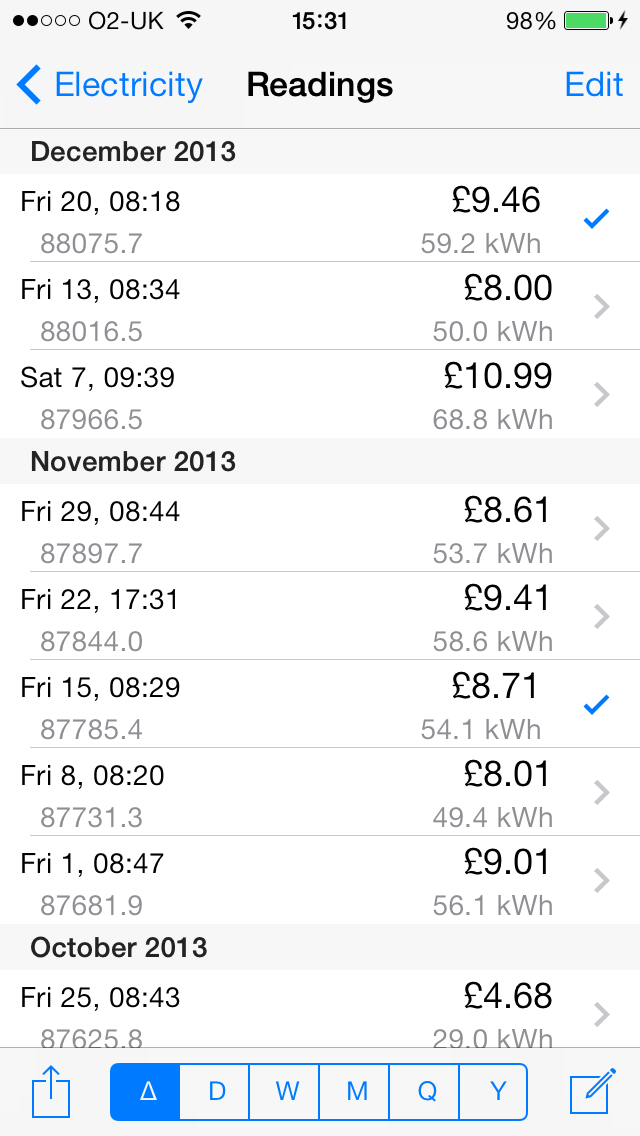
mricon57 This is a MAJOR UPDATE, adapting the user interface to iOS 7. If you don’t like change, or you don’t like the iOS 7 interface in other apps, PLEASE DON’T UPGRADE(*) as there is no easy way to go back. For a preview of how the app looks, see the screenshots on the AppStore or here.

Also included in v4.0 are the following enhancements …

Moved the meter settings to a single Meters screen (at the top left). This screen has three functions: to jump to the selected meter on the graphs screen, to manage your meter list and to change your meter settings and rates.

For meters that don’t use rates, you can now set the meter currency to N/A. On the iPad this displays a single graph for usage only, rather than usage plus an empty cost graph.

If you have more than 9 meters, you can now scroll left/right between them all without having to jump to a specific meter first. This change also improves the memory usage of the app, to help prevent memory exhaustion crashes.

Added a setting to turn on/off the “next meter” question when adding readings (some people prefer to add readings one at a time).

Made the user guide more visible (from the settings icon on the main screen).

Other minor improvements.

Note that the minimum iOS version now supported is 5.0.

* if you have enabled AUTOMATIC DOWNLOADS for UPDATES in your iTunes & App Store settings, you might want to turn this off!

Hill Lists 4.0 now available

hlicon57 This is a MAJOR UPDATE, adapting the user interface to iOS 7. If you don’t like change, or you don’t like the iOS 7 interface in other apps, PLEASE DON’T UPGRADE(*) as there is no easy way to go back. For a preview of how the app looks, see the screenshots on the AppStore or here.

Also included in v4.0 are the following enhancements …

On the list screen, I now display more meaningful areas or regions per hill. You can still see section numbers by sorting by section, or on each hill screen.

Added a sort by ascents option, which sorts a list of hills by decreasing ascent counts.

Changed the icon and launch screens for the winter. The image is (of course) Buachaille Etive Mor.

Other minor improvements.

Note that the minimum iOS version now supported is 5.0.

* if you have enabled AUTOMATIC DOWNLOADS for UPDATES in your iTunes & App Store settings, you might want to turn this off!

iOS 7 user interface changes

Apple releases a new version of its mobile operating system (iOS) every year, around September/October. The latest version is iOS 7, and it brought a completely new look and feel, with flatter colours, thinner fonts(*) and a paler look to a lot of apps. The following Apple apps are good examples: App Store, Calendar, Clock, Mail, Messages, Photos and Settings.

Some of the iOS 7 UI changes apply immediately to all apps, e.g. the alert and action popups – these now have a white background. Other UI changes happen when a developer re-builds their app with the latest Software Developer Kit (SDK) from Apple. An app built for iOS 7 can still run on earlier iOS versions, and in fact the old user interface will still be used on iOS 5 or 6.

The UI displayed is therefore down to which version of iOS you are running, rather than the app itself.

Some people don’t like iOS 7. This is perfectly fine (of course), and as a consumer you can choose not to upgrade to Apple’s latest OS (or buy their latest gadgets). If you are running iOS 5 or 6, all your existing apps are likely to look the same, even if they are updated to support iOS 7. But if you have upgraded to iOS 7, an app designed and built for iOS 7 simply can’t support the old style interface. The only way a developer could do this would be to release two separate versions of each app.

I don’t want to do this, but I do want to move forwards. I am therefore about to release new versions of Hill Lists and Meter Readings, and I am rebuilding Account Tracker too. If you are running iOS 7 and really don’t like the iOS 7 interface, you have two simple choices: downgrade your operating system (very complex), or don’t install the app updates (very easy).

No-one is forcing you to update an app, just leave it on its current version and the UI won’t change!

I hope this explains the situation. No doubt I will get a few negative reviews complaining about the new interface. However this is not the fault of the apps, it is really the user’s choice of iOS that forces the UI change.

* in iOS 7 you can change the default fonts to be bold in the main settings app, under General then Accessibility.

2013 highlights

As 2013 comes to a close, I would like to wish everyone a happy and prosperous new year – hopefully 2014 will be a good one!

Here are some personal highlights from the past 12 months …

  • My wife and I celebrated our 25th Wedding Anniversary 🙂
  • My eldest son graduated and has started work
  • My youngest son passed his driving test and has started University
  • I started using Strava in April: 137 runs to date covering 1,121 km with 21,738m of ascent
  • I climbed 28 new Munros (Scottish hills over 3000ft – I have 46 to go out of 282!)
  • We visited the US in October but it was closed 😦
  • I celebrated 15 years at my day job

And some app highlights …

  • My website had 110,000 views, 1288 on the most popular day (2nd January). These came from 161 countries!
  • iOS 7 was released, and as usual this caused a few problems
  • I did 15 app updates throughout the year: 5 each on Account Tracker and Meter Readings (for iOS), 3 on Hill Lists and 1 each on Account Tracker and Meter Readings (for Windows Phone)
  • My first Mac app is taking shape, and I submitted a backup viewer for Account Tracker to Apple on 11th December. It will be a highlight of 2014 when they finally approve it!

Now, its time for a beer I think … cheers!

Meter Readings 1.1 for Windows Phone now available

mrwpicon57 This release adds a few bits of functionality missed from version 1.0.

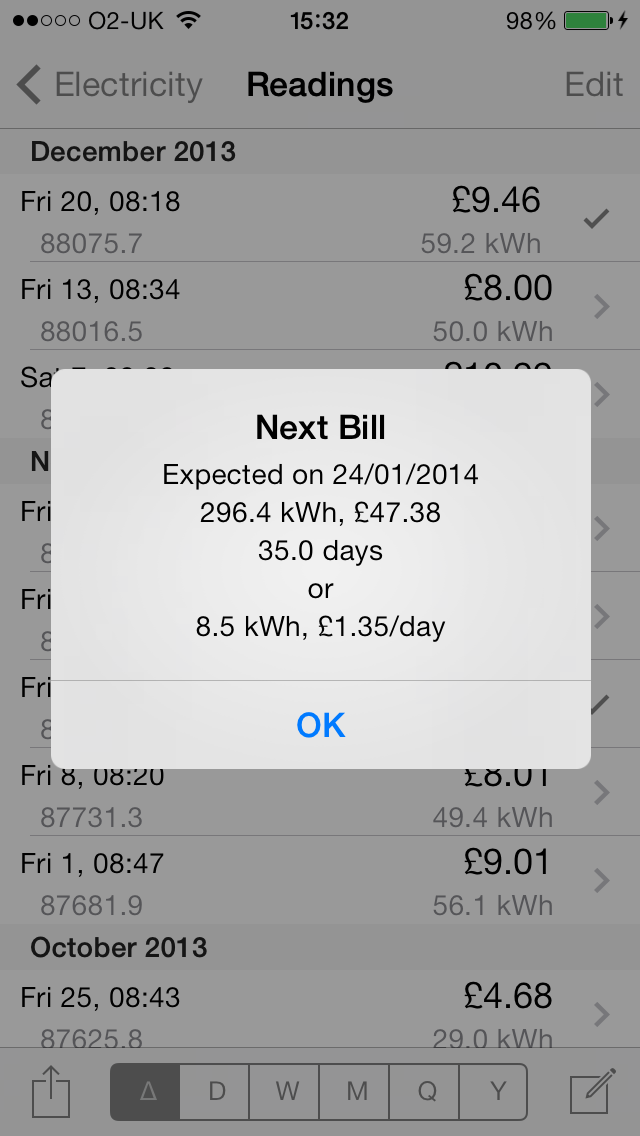
Added support for marking readings as bills, and then on the readings screen viewing only billed readings. This lets you check your bills, get a quick readout of your usage and costs since your last bill, and an estimate of when and how much your next bill will be.

Added support for rate changes, e.g. if you change supplier or they change their rates (this usually happens every year!).

Added a price comparison feature for UK users. As the app knows your usage, you can quickly find out if there are better deals on the market for your area. Follow the link provided and you can quickly and easily switch providers.

ATB Viewer for Mac

atbv-64x64
What’s this I hear you say? A new icon?

As you probably know by now, I have been working on a Mac version of Account Tracker for some time. I even signed up to the Mac developer program a few weeks ago, and this has got me fired up! I really want to get something out before Christmas, but it is clear I am not going to be ready with a full app by then. So as an interim step, I will be releasing a companion app that lets you view your iOS backup files and data on the bigger screen of your Mac!

It can automatically load your latest backup from iCloud, and apply recent changes if you are using iCloud syncing. Alternatively you can manually select a backup file to open (e.g. from Dropbox).

You then have full access to your accounts, budgets, reports and transactions. The only things you cannot do is add or edit transactions, or change (most of) your settings. These changes will come with the full version in the new year.

So … I am currently adding the few final touches, and doing some last minute testing. I thought I was close a week ago, but getting to grips with publishing a Mac app has taken a large amount of effort, far more than I expected!

I am hoping to submit it to Apple in a couple of days. 🙂

Account Tracker for Mac update #7

atmac-64x64
I have just released my 7th beta to the small number of people helping to test it and provide feedback.

To be honest I have not made a huge amount of progress since my last update, mainly due to iOS 7 and having to update all of my existing apps as a result. However I am starting to make good progress on editing transactions.

Other areas that need work are reconciling, iCloud and Dropbox integration (including syncing), importing and exporting transactions (CSV), PDF reports and of course settings.

Further updates will happen when they happen! 🙂

Meter Readings 3.4 now available

Fixed a number of issues introduced by iOS 7, specifically rotation glitches (on both the iPhone and iPad), and swipe between meters not working if you swipe the graphs (iPad only). I have also improved the text displayed when you touch and hold the graphs to show things like the day of the week.

Note that for users running iOS 7 and above, Bluetooth is no longer supported. Apple have deprecated the way this works, and I need to completely rewrite it.